Features
Everything you need to ship a polished app.
Widgets are drawn by RenGL itself, so you control how every pixel looks. Ten areas, one toolkit. Each one links to runnable code on the Code page.
UI toolkit
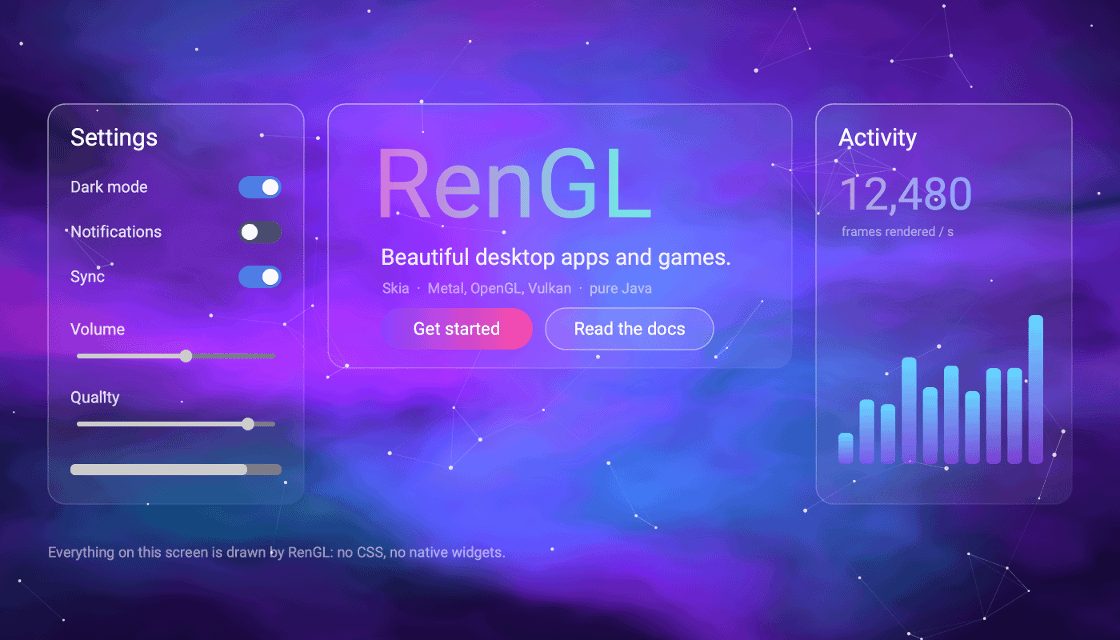
Every widget is drawn by RenGL, so an app looks the same on macOS, Windows and Linux, and nothing is held back by a native control.
- Text: single-line fields, multi-line areas, a rich text editor and Markdown-formatted text, with offline spell checking. Text in any script, and the system input method for Chinese, Japanese and Korean.
- Choices: buttons with icons, checkboxes, radio buttons, toggle switches, dropdowns, combo boxes, sliders, range sliders, spinners, color pickers and date/time pickers.
- Data: sortable, resizable tables with check boxes and cells you edit in place, trees, list boxes, accordions, tabs, scroll areas, context menus and tooltips.
- Charts: line, bar, scatter, bubble, pie and donut charts drawn by the engine, with log and time axes. Live data eases into place, pointing shows a tooltip, and a legend entry hides its series.
- Game widgets: knobs, gauges, a virtual joystick, a minimap, hotkey capture, an inventory grid, a developer console and a radial menu.
- Dialogs & messages: modal containers that block what is under them, message boxes, toasts, tool bars and status bars, and popups that paint over everything.
- Keyboard & accessibility: buttons, check boxes, sliders and links are Tab stops with a focus ring, and every element has an accessible role and name. With
rengl-accessibilitythe window speaks as focus moves, and on Windows NVDA, JAWS and Narrator read it through UI Automation. Next release - Icons: the Feather icon set is bundled, drawn in the label's color.
Key classes
ButtonOverlayTextFieldOverlayTextAreaOverlayRichTextAreaOverlayDropdownOverlaySliderOverlayToggleSwitchOverlayCheckBoxOverlayColorPickerOverlayDateTimePickerOverlayTableViewTreeViewListBoxComboBoxOverlayLineChartOverlayBarChartOverlayScatterChartOverlayPieChartOverlayKnobOverlayGaugeOverlayToastManagerModalContainerAccessibility
Layouts
A layout is a container that positions its children for you, every frame. They nest freely, so a toolbar inside a column inside a dock is normal.
- Six layouts: vertical, horizontal, grid, stack (layered), flow (wraps) and dock (a header, a sidebar and a content area that fills the rest).
- Sharing space: give children weights or relative sizes and they split what is left as the window is resized.
- Fit to content: a layout can size itself to its children, and elements can be anchored to any corner or the center.
- Panes and tabs: split containers with a draggable divider, and tab containers with closable, scrolling tabs.
- Layouts as data: describe a whole screen in a JSON file and load it with one call.
Key classes
VerticalLayoutHorizontalLayoutGridLayoutStackLayoutFlowLayoutDockLayoutSplitContainerTabContainerAnchorUiFile
Choosing one
A list: vertical. A toolbar: horizontal. Label and field pairs: a two-column grid. A badge on an icon: stack. Chips that wrap: flow. An app shell: dock.
Styling & themes
There is no CSS engine and no native look to fight. Every style is set from Java, and a theme can restyle the whole app while it runs.
- Boxes: backgrounds, borders, corner radii, hover colors and opacity on every element.
- Paints: solid colors, gradients, gradients that slide, and a color-cycling rainbow, for fills and borders alike.
- Themes: light, dark and crimson are built in, or write your own. Anything you set by hand stays pinned when the theme changes.
- Backgrounds: animated dot grids, constellations and electric nodes behind any element or the whole window, and even a live 3D scene.
- Fonts & vectors: custom fonts, and SVGs rendered at any size.
- Shader effects: write an SkSL shader and run everything an element draws through it.
Key classes
StylingColorLinearGradientScrollingGradientRainbowColorThemeManagerDarkThemeLightThemeCrimsonThemeConstellationBackgroundDotGridBackgroundAnimatedDotBackgroundElectricNodeBackgroundShaderEffect
Draggable containers
Containers that behave like little windows inside your window: the user can move them, resize them and rearrange what is in them.
- Dragging: one call turns it on. Keep a panel inside a rectangle, and make it stop flush against others.
- Resizing: a resizable container follows the window, scales its children and fonts, and lets the user drag its corners.
- Reordering: grids the user rearranges by dragging, with optional free placement for inventory-style slots.
- Scrolling: scroll containers with themed scrollbars, inside which tables and trees are built.
- Modals: dialogs that block the UI beneath them, with a close animation.
Key classes
ContainerResizableContainerReorderableGridScrollContainerSplitContainerModalContainer
Animation
Transitions animate elements. Tweens and sequences animate everything else. All of it is driven by delta time, so it runs the same on a 60 Hz and a 240 Hz screen.
- One-liners: fade in and out with a callback, pop an element in with a scale transition, pick from ten easing curves including back, elastic and bounce.
- Tweens & sequences: count a score up, bob a coin forever, or script "wait, zoom the camera, open the door" as steps.
- Scene transitions: fade, slide or wipe between screens.
- Locking: a title card can hold the game still, and be skipped with a key press.
- Your own: implement one small interface to draw anything animated over an element.
Key classes
FadeTransitionScaleTransitionTransitionEasingTweenSequencePlayableSceneTransition
2D game framework
Scenes, a fixed-step loop, a camera, sprites and particles, in a plain window with no separate game engine on top. The UI toolkit is right there for menus and HUDs.
- Scenes: menus, levels, pause screens and popups on a stack, with logic at a fixed tick rate and smooth drawing in between.
- Entities: build levels as data. Entities with components are saved to and loaded from JSON.
- Graphics: a camera with follow, dead zone, bounds and shake; sprites, atlases, frame animation, Tiled maps in orthogonal, isometric, staggered and hexagonal layouts, and a batch that draws thousands of sprites per call.
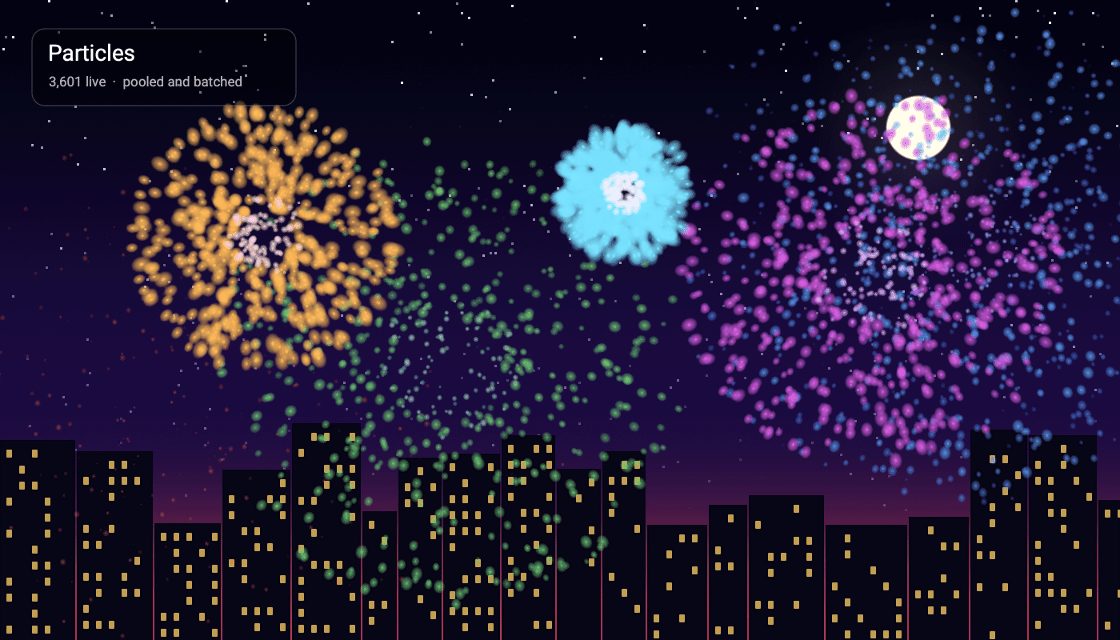
- Particles & shaders: pooled particle systems, plus SkSL shaders and post effects.
- Toolbox: geometry and raycasts, spatial grids, an event bus, object pools and seeded random numbers.
- Input: named actions that players can rebind, on keyboard, mouse and gamepad. Xbox, PlayStation and Switch Pro pads need no setup, and a stick or trigger gives smooth analog movement.
Key classes
SceneSceneManagerGameTimeEntitySceneCameraSpriteSpriteBatchTextureAtlasParticleSystemTileMapInputContextGamepad
Audio & video
OpenAL sound with positional audio and streamed music, and a video element that plays inside your UI.
- Formats: Ogg Vorbis, Opus, FLAC, MP3 and WAV.
- Sounds & music: short sounds are decoded once and overlap freely. Music streams from disk and crossfades between tracks.
- Mixing: channels, volume, pitch, pan and fades, plus pitch variation and play limits so a gunshot never sounds mechanical.
- 3D sound: distance falloff, Doppler, cones, occlusion and reverb presets. It works in 2D games too.
- Video: streamed from disk, so a huge file costs no more memory than a short one. H.264, HEVC and AAC play through the system decoder: AVFoundation on macOS, Media Foundation on Windows and GStreamer on Linux. Motion JPEG with PCM sound plays on every platform.
Key classes
AudioSoundMusicPlaybackAudioChannelReverbVideoOverlayVideoPlayer
Good to know
The Linux decoder was written from GStreamer's headers and has not been confirmed on real H.264 files, so test it, or ship Motion JPEG there. On Windows, HEVC needs Microsoft's free HEVC Video Extensions, and the decoder is new and lightly tested. The docs include the FFmpeg command to convert.
3D Optional
The UI stays 2D. The 3D layer renders into a picture that the UI draws like an image, so 3D can sit in a panel or behind the whole window. Programs that don't use it never pay for it.
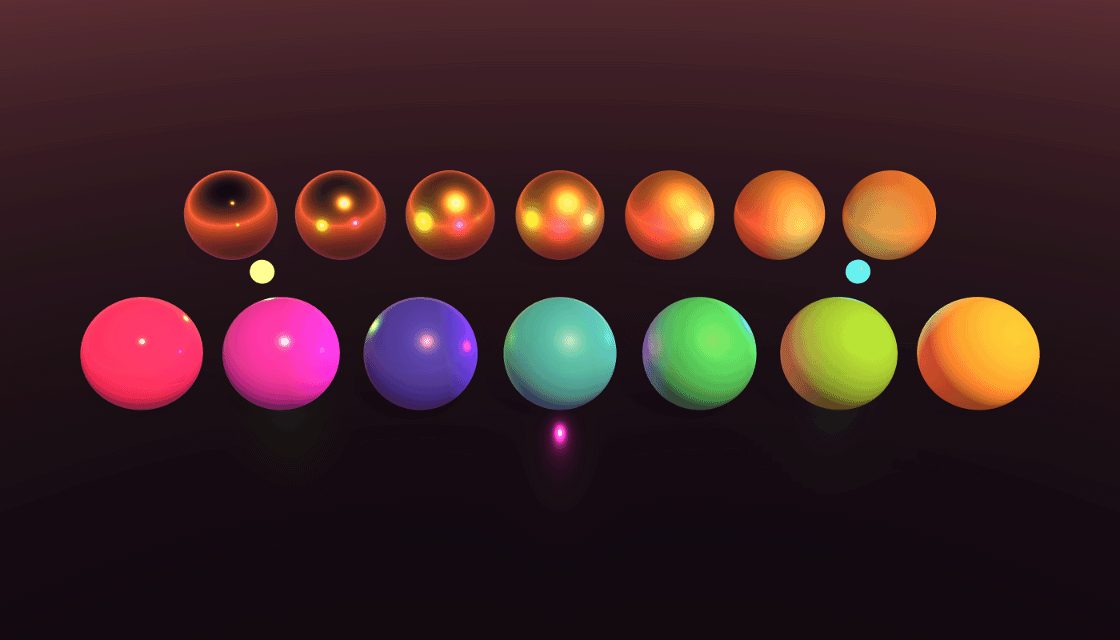
- Materials & light: classic and physically based materials, with height maps drawn by parallax occlusion mapping. Sun, spot (with shaped cones) and point lights, with shadows and cascades for big scenes.
- Many lights: a clustered grid shades about 2000 lights without shadows, on top of the 64 that every pixel tests, and up to eight lights cast shadows. Surfaces can glow onto their surroundings, and occlusion culling skips what is hidden.
- Blinking lights: status LEDs, pulses, flickering tubes and dying neon signs, with the lamp and the bulb in it kept in step. A light that is off costs nothing.
- Ray tracing: exact shadows, reflections, ambient occlusion, one-bounce global illumination and full path tracing, each a single call. Hardware on Vulkan GPUs with ray queries (NVIDIA RTX, AMD RDNA 2 and later, Intel Arc), shader code on any other Vulkan 1.2 GPU, a Mac included. DLSS Ray Reconstruction denoises the paths on RTX cards.
- Upscaling & frame generation: draw at a fraction of the size and enlarge it. A built-in temporal upscaler works on every GPU. AMD FSR 3, NVIDIA DLSS and Apple MetalFX, and DLSS and FSR frame generation, come from the optional
rengl-upscalemodule, which carries no vendor code. - Levels of detail: simpler meshes are generated or read from the model, chosen by how many pixels of error they would cause, with dithered fades and a picture card for the far distance. Next release
- Skies: gradients, cube maps, panoramas and HDR skies that light and reflect in the scene, plus tone mapping, bloom and fog.
- Finishing: ambient occlusion, saturation and contrast, shadow and highlight tints, chromatic aberration and a vignette.
- Screens in the world: put any UI container, buttons and text fields included, on a surface in the scene, and let the player aim at it and click.
- Models: glTF, GLB, OBJ, FBX and Collada, with skeletal animation and morph targets.
- Physics: rigid bodies, colliders from boxes to concave meshes, stacking, continuous collision for fast bodies, joints, a character controller and raycasts, in plain Java. Or step the same world with NVIDIA PhysX 5 from
rengl-physx. - Scale: instancing draws thousands of copies of a mesh in one call, and custom GLSL shaders run on both backends.
Key classes
Scene3DViewport3DBackground3DNode3DMaterialLightLightAnimationLightPatternUiScreenSkyboxModelAnimationPlayerPhysicsWorldRigidBodyOrbitControlsUpscalersDlssProviderFsrProviderMetalFxProviderPhysXLodSettings
Good to know
3D needs OpenGL or Vulkan, so on macOS a 3D program asks for Vulkan (through MoltenVK). The demos have been run on macOS (Apple silicon), on Windows 11 with an NVIDIA RTX 4090 and on Linux. FSR 3, DLSS, both frame generations and Ray Reconstruction have run only on that RTX 4090. MetalFX was written without a Mac to try it on, ray tracing has only been checked on NVIDIA, FSR 4 has never run on an AMD GPU, and Intel XeSS is not supported. FSR and DLSS need the vendors' libraries, which you download yourself.
App plumbing
The unglamorous parts that every real app needs, already done.
- Windows: several windows on one engine; fullscreen, borderless and always-on-top, all changeable on a running window. Even the graphics API can be switched live. A window that has lost focus redraws at a capped rate to save power.
- Files: the operating system's own open, save and choose-folder dialogs, files dropped onto the window, and on Windows files dragged back out of it.
- Web views: a page inside your UI, for a login portal or an embedded browser: WebView2 on Windows, or an installed Chrome, Edge, Chromium or Brave elsewhere, with typing, the mouse and input methods passed through.
- Splash screen: an animated RenGL splash plays over the first window, with sound if audio is present. Turn it off or replace it with your own, and warm-ups load pipelines and upscalers behind it.
- Background work: timers, async tasks whose results arrive on the render thread, and a loader with progress for loading screens.
- Downloads: resumable, checksum-verified HTTP downloads over several connections, with ready-made progress displays.
- Config & paths: readable config files with nested sections, and an environment that puts shipped files and per-user data in the right place.
- Input: polled keys and mouse, locked cursor for games, and rebindable named actions.
- Modules: depend on what you use, from Maven Central. A window and UI is
rengl-core; audio, video, web views, Vulkan, 3D, charts, tile maps and the rest are separate artifacts, or take them all withRenGL.
Key classes
EngineWindowWindowOptionsFileDialogSchedulerLoaderDownloadConfigAppEnvironmentInputContextWebViewOverlaySplash
Packaging
Your players do not have Java, so an app carries its own. The RenGL packager turns your jars into something a player can run or install, with no jpackage, WiX or NSIS.
- App-images: a folder (or a
.app) with a native launcher, a private Java runtime trimmed to the modules your jars use, and your jars. Zip it and it runs anywhere with no install. - Installers: a
setup.exeon Windows with an install-folder page, desktop and Start menu shortcuts and an uninstaller, and a.deband an.rpmon Linux with an application-menu entry. The setup installs per user by default, so it needs no administrator rights, offers an install-for-all-users choice, and also runs silently for scripts. - Every platform from one computer: Windows x64, Linux x64 and arm64, macOS x64 and arm64, built on whichever machine you have.
jpackagecan only build for the platform it runs on. - One settings file: run
package-app.ps1 -Initonce and it reads yourpom.xmland writesrengl-package.propertieswith the name, main class, version, platforms, icons and extra files. Thenpackage.cmdbuilds. - Opening files: register the file types your app opens, so the Windows setup adds it to Explorer's Open with list and macOS lists it in Finder. Add your own right-click entries in Explorer too.
- Same paths everywhere: an installed app finds its assets and its per-user data through
AppEnvironmentexactly as it does from the IDE. - Or use
jpackage: for a.msi,.dmgor.pkg, or file-type registration on Linux. The guide has the commands, plus macOS signing and notarizing.
You get
MyApp-1.0.0-windows-x64-setup.exeMyApp-1.0.0-windows-x64.zipMyApp-1.0.0-linux-x64.debMyApp-1.0.0-linux-x64.rpmMyApp-1.0.0-linux-x64.tar.gzMyApp-1.0.0-macos-arm64.tar.gz
The pieces
rengl-packagerpackage-app.ps1rengl-package.propertiespackage.cmdAppEnvironment
Good to know
Built and started on Windows 11, with the setup run both through its wizard and silently. The macOS arm64 image was run on a Mac. The .deb and .rpm have not been installed, the all-users setup was run only as far as its administrator prompt, and the Linux images and the macOS x64 image have not been launched. Nothing is signed yet, so a downloaded setup triggers SmartScreen, and macOS asks you to right-click and choose Open.